
FiddlerCap
Capturing web traffic logs
Fiddler Cap is your Windows-only web traffic log capturing tool for when you as an end-user need to capture a bug in your web browser or website.
It requires no setup, making it easy for any user to capture web traffic and send the network logs to an internal tech team for debugging.
Again, because troubleshooting doesn’t need to be complicated, Fiddler Cap is a complimentary desktop-based capture app within the Fiddler family of products.
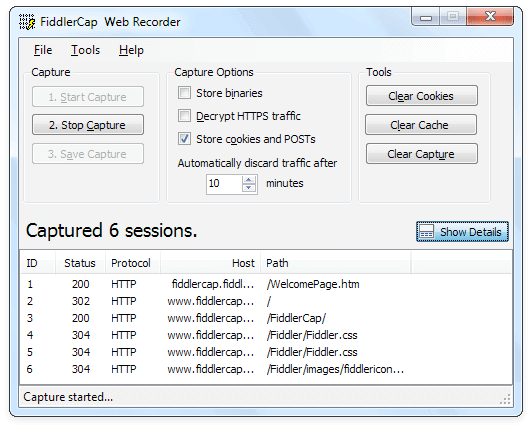
Step-by-step guide

Download and install Telerik FiddlerCap.

FiddlerCap will start automatically when the installer completes.

(Optional) Inside FiddlerCap, click the Clear Cookies button and then the Clear Cache button.

(Optional) Inside FiddlerCap, check the Decrypt HTTPS Traffic box. Note that FiddlerCap uses the system proxy and installs & trusts the root certificate on an OS level. If you are using Firefox (or another browser that uses its own certificate store) then refer to the instructions here.

Inside FiddlerCap, click the 1. Start Capture button.

Use the browser’s address bar to go to the site you need to reproduce the problem.

(Optional) Add a screenshot to your capture by clicking on the Screenshot button inside FiddlerCap. Add a comment by clicking on the Flag button.

Inside FiddlerCap, click the 2. Stop Capture button.

Click the 3. Save Capture button. Save the .SAZ file to your desktop.

Open the generated SAZ with Fiddler Everywhere to continue the debugging or email the .SAZ file from your desktop to your debugging buddy.
Fiddler Jam
A web-based end-to-end troubleshooting solution for support teams.
More about Test Studio
Automated functional, load, and
performance testing.
More Free Trials
All free trials for Telerik products
and services.